In an earlier article, WordPress 3-Minute Hooking: Automatically Generate img alt Attributes from the Nearest Heading, I introduced a technique for automatically inserting alt attributes by using the the_content filter.
The plugin I teased at the end of that article—a plugin that uses generative AI to suggest alt text automatically—is now complete.
This article is an introduction to that plugin.
Hooks Alone Have Their Limits
The approach from the previous hook-based article was to use the text of the nearest preceding heading as the alt text. That was a major improvement over having nothing at all, but it still does not mean the alt text is based on an actual understanding of the image itself.
For example, even if there are three images under the heading “WordPress Security Settings”:
- Image 1: A screenshot of the WordPress admin dashboard
- Image 2: A plugin settings screen
- Image 3: A final confirmation screen after setup
Simply labeling them as “WordPress Security Settings 01–03” would still not qualify as truly appropriate alt text.
Proper alt text should be written after reading the surrounding text and understanding what the image is explaining. That is exactly what this plugin is designed to help with automatically.
What Is Edel Alt AI?
Edel Alt AI is a WordPress plugin that uses generative AI to analyze article content and suggest appropriate alt text for images whose alt attributes are missing or empty, then save those results.
An important design principle is that the AI does not save anything automatically. Instead, the workflow is: AI suggests → human reviews and edits → human saves. A fully automatic system would risk inserting a large number of unintended alt values, so the final decision is always left to a human.
Main Features
1. Article List Screen
You can review a list of articles that contain images with missing or empty alt attributes.
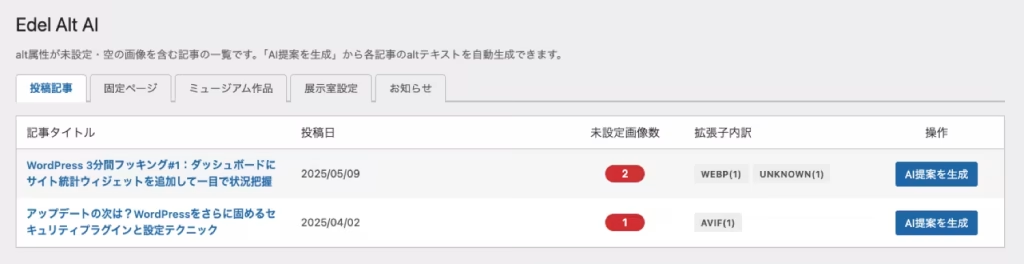
The list displays the following information:
- The article title and publish date
- The number of images with missing alt text (shown in a red badge)
- A breakdown of file extensions (WEBP, AVIF, UNKNOWN, and so on)
You can also switch between post types—such as posts, pages, and custom post types—using tabs. Custom post types such as museum works and exhibition room settings are also supported.
2. Article Detail Screen (AI Suggestions)
When you click the “Generate AI Suggestions” button, the AI reads the body of the article and suggests appropriate alt text for each image.
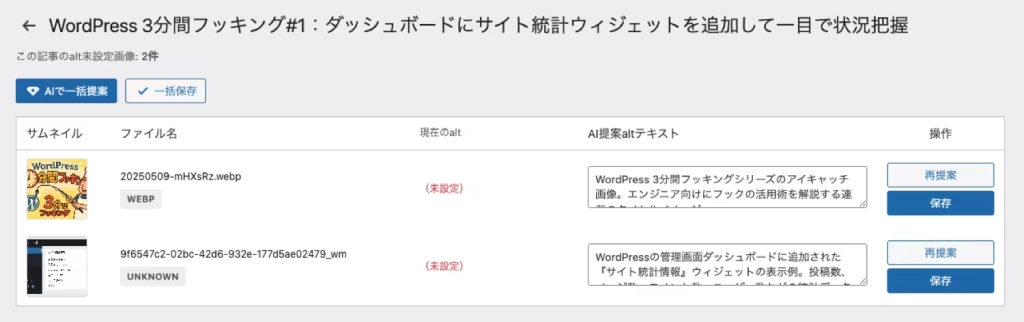
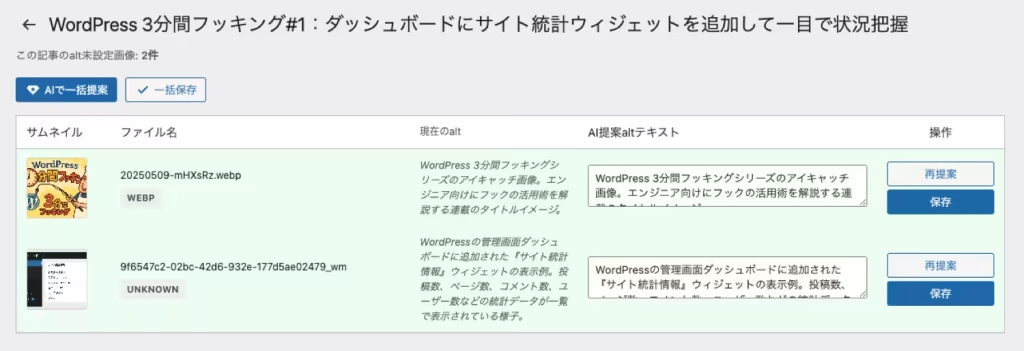
The detail screen shows the following:
- Image thumbnails
- File names and extension badges
- The current alt value (shown as “Not set” if missing)
- The alt text suggested by AI (editable in a text field)
You can edit the suggested alt text before saving. If you do not like a suggestion, you can regenerate it individually using the “Suggest Again” button. After reviewing and editing, you can apply the results to the article content using either “Save All” or individual save actions.
3. Settings Screen
You can configure the AI provider, API key, and prompt from the admin screen.
| Setting Item | Details |
|---|---|
| AI Provider | Choose from Google Gemini / OpenAI |
| API Key | Enter the API key for the selected provider |
| Model Name | Specify the model to use (for example, gemini-2.0-flash) |
| Prompt | You can customize the instructions sent to the AI. The article body is automatically appended at the end of the prompt. |
Gemini is a good option for people who want to try it first, since you can obtain a free API key through Google AI Studio.
Patterns of Missing Alt Text That the Plugin Supports
| Pattern | Supported? |
|---|---|
| The alt attribute itself is missing | ✅ Supported |
alt="" (empty string) |
✅ Supported |
alt=" " (whitespace only) |
✅ Supported |
| Alt text is already set | ❌ Not supported (it will not overwrite existing alt text) |
Notes and Limitations
- Images output by page builders such as Elementor are not supported, because they do not pass through
the_content - Since API communication with the AI provider is required, processing may take time if there are many articles or many images
- The quality of suggested alt text depends on the prompt and the performance of the AI model. Always review the content before saving
- API usage fees follow the pricing model of each provider
When to Use the Hook and When to Use the Plugin
The hook from the previous article and this plugin serve different purposes. Use them based on what you need.
| 3-Minute Hooking (Previous Article) | Edel Alt AI (This Article) | |
|---|---|---|
| When it runs | Real-time processing at display time | Manual execution in the admin screen with DB save |
| Alt text quality | Generated mechanically from the nearest heading | Generated semantically by AI reading the context |
| Cost | Free | AI API usage fees apply |
| Best for | When you want to add alt text as easily as possible | When you want to set more appropriate alt text carefully |
A cost-effective workflow is to first use the hook to make broad improvements across all articles, then use AI suggestions from the plugin to fine-tune only your important articles.
You Can Download Edel Alt AI for Free
Edel Alt AI is distributed free of charge through the Stores plugin shop. You can simply install it in WordPress and start using it right away.
Please give it a try. I’d also love to hear your feedback and bug reports.
You can also browse the full list of both paid and free plugins on the following page.
Summary
- You can identify articles that contain images with missing or empty alt attributes
- The AI reads the article body and suggests meaningful alt text for each image
- Suggestions can be edited and are only saved after human review, preventing unintended alt values from being inserted
- Supports Google Gemini and OpenAI, and the prompt itself can also be customized
Please also see the following pages for WordPress SEO improvement and maintenance support.