I’m Yabe @ Edel Hearts, based in Kawagoe, Saitama, where I specialize in WordPress customization and plugin development.
On April 1, 2026, Cloudflare announced “EmDash”, a CMS positioned as the spiritual successor to WordPress. As an engineer, I could not ignore this wave. So I set up a local environment on my Mac and conducted a thorough comparison with the WordPress admin dashboard that I use every day.
This time, I intentionally limited the scope to “testing in a local environment.” As for deployment to a production environment on Cloudflare, I plan to wait for the infrastructure side to mature a bit more and report on that separately in a future article once I succeed. For now, I want to focus on showing just how impressive the “inside” of this CMS really is.
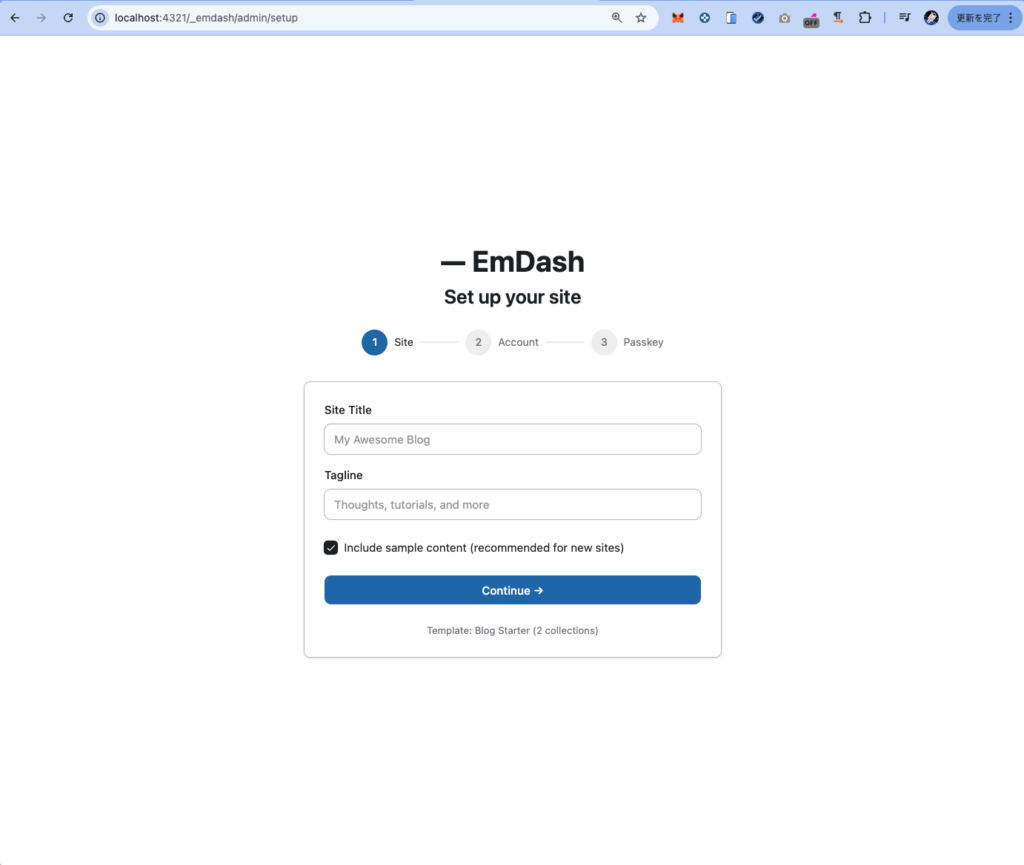
1. Local Setup: As Easy as Local (by Flywheel)
When it comes to local WordPress environments, “Local (by Flywheel)” is the standard choice, but the EmDash setup experience felt just as smooth.
From running npm create emdash@latest in the terminal to getting the local server up and running, the speed felt truly next-generation. The fact that the development environment came together almost instantly, with about the same level of ease as WordPress Local, left a very positive impression.

2. A Thorough Comparison of the Admin Dashboard
From here, I want to examine the EmDash admin screen from the perspective of a WordPress engineer. To eyes accustomed to the WordPress dashboard, it felt very fresh.
■ A Sidebar Menu That Reveals the Difference in Design Philosophy
One long-standing pain point with the WordPress sidebar menu is that each plugin tends to add its own menu items as functionality expands, which gradually makes the structure harder to organize. In contrast, EmDash comes with foundational extensibility features such as “Content Types” and “Webhooks” already arranged in an organized way from the start.
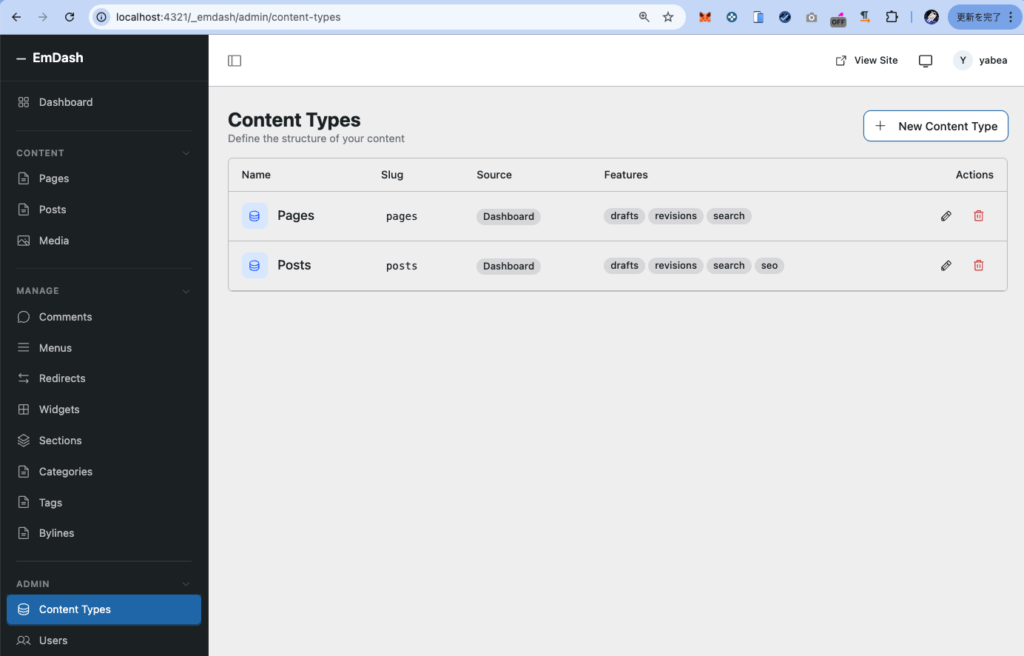
Of course, if EmDash gains more plugins in the future, its menu structure will also grow. Still, because extensions are designed to run as independent Workers, it leaves the impression of being a structure where administrators can more easily control “what exists where”.
■ Features That Would Be “Plugin Required” in WordPress Are Built In
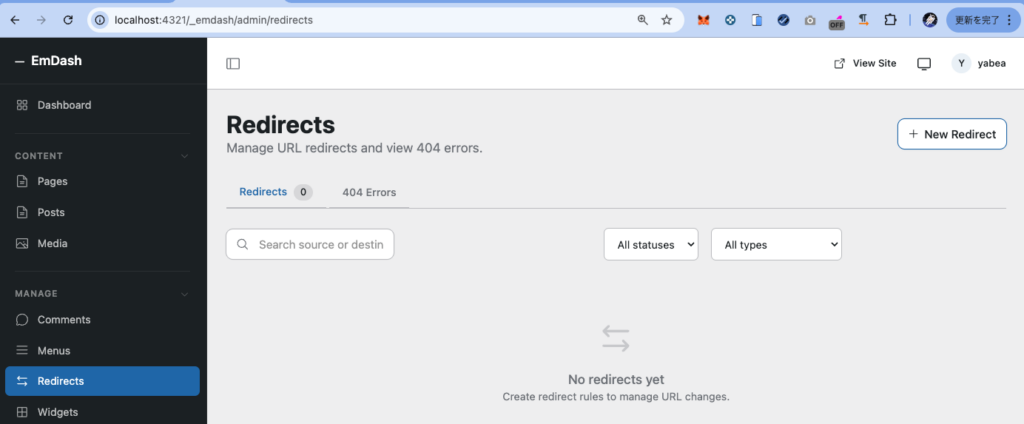
What surprised me was that features you would almost certainly install via plugins in WordPress—such as functions similar to “Redirection” or “Yoast SEO”—are integrated as core functionality from the beginning.
- Redirects: 404 monitoring and redirect settings are available as standard menu items.
- Widgets & Sections: Sidebar and reusable block management are organized in a very visual and intuitive way.
- Content Types: Custom post type definitions are built in as a standard feature. As a developer, I found it an extremely satisfying design that metadata-related features such as
drafts / revisions / search / seocan be controlled with simple checkboxes.
■ A Strong “Built for Engineers” Message in the Login System
What surprised me most during setup was the authentication design. The login options include Passkey, GitHub, and Google.
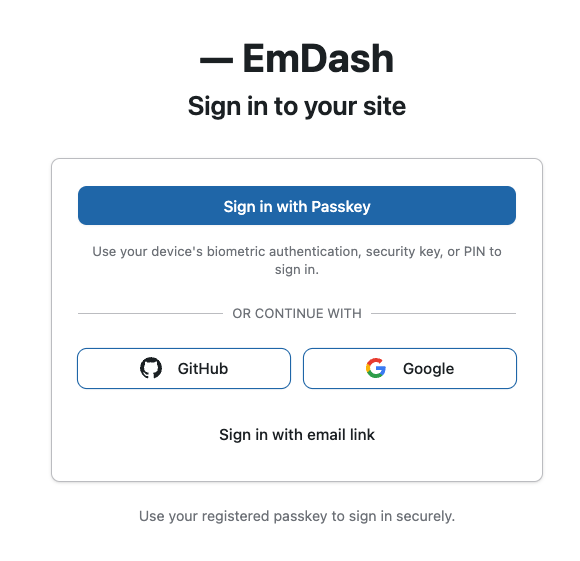
The fact that GitHub is provided as a standard login option gave me a strong impression that this CMS is built around a design philosophy that clearly prioritizes what engineers find comfortable and intuitive. Also, the emphasis on Passkeys felt like a very modern and powerful response to the current reality that many security incidents are caused by weak passwords.
3. My Own Take: What EmDash Needs to Become Dominant
Now, its technical strengths are clear—but can EmDash really become something that replaces WordPress?
I believe the success of EmDash comes down to one thing: how effectively it can attract and retain both users and contributors (developers). WordPress grew into what it is today because there were users all over the world saying, “I want to build sites with this,” and a massive ecosystem of developers responding by creating appealing themes and plugins.
For EmDash to gain momentum, the following elements will be essential:
- Appeal for developers: How many engineers will be drawn in by a modern development experience built around TypeScript?
- A sense of confidence for users: Can it build enough depth of information that people feel, “If I run into trouble, I can Google it and find an answer”?
If this “network of people” and “chain of contributions” does not happen, even excellent technology will remain isolated. The real question is how many people EmDash can pull into its ecosystem going forward. That is what will determine whether it truly takes off.
4. Conclusion and What Comes Next
I love WordPress, and I want to see it continue to grow. But favoring WordPress so much that I ignore new technologies would not be fair.
This round of testing convinced me that EmDash contains a real vision of what the future of the web could look like. For now, I only verified it in a local environment, but once I successfully deploy it to Cloudflare, I plan to publish a second article that examines its performance in more depth.
Edel Hearts specializes in WordPress, but I will continue to watch the “next move” with an open and objective perspective.
How did this new wave strike you?
If you have thoughts, or if there is anything you would like me to explore further, I’d love to hear from you.