When implementing membership features or login functionality in WordPress, most cases rely on WordPress’s built-in user management system.
Of course, this is not wrong in itself. WordPress provides mechanisms such as the wp_users table, cookie-based login persistence, role and capability management, and password reset functionality out of the box.
However, in real-world projects, you may encounter challenges such as:
- You do not want to centralize authentication data within WordPress
- You want to separate login flows for general users and administrators
- You want a shared authentication foundation across multiple services
- You want to avoid bloating the
wp_userstable with unused accounts
This approach is implemented in the WordPress plugin I developed: Edel Auth for Supabase.
I also explain the design philosophy behind the plugin in more detail in the following article:
[Official Release] Supabase Authentication Plugin for WordPress: Edel Auth for Supabase
In this article, I’ll first整理 how WordPress’s native authentication works, then explain why combining it with external authentication like Supabase is effective, and what design considerations were important in implementation.
How WordPress User Authentication Works
First, it’s important to understand that WordPress’s login system is not simple.
User data is stored primarily in the wp_users and wp_usermeta tables. After a successful login, session state is maintained using cookies. Based on that login state, WordPress identifies users and controls their permissions using roles and capabilities.
What Is Stored in wp_users
The wp_users table stores usernames, email addresses, display names, and password hashes. Since WordPress stores passwords as hashes rather than plaintext, a baseline level of security is ensured. In WordPress 6.8, password hashing was further improved with bcrypt becoming the standard, aligning it more closely with modern security practices.
However, even with hashed passwords, concentrating all authentication data within WordPress is not always the best design choice.
For example, when building a membership site that integrates with external services or custom applications, relying too heavily on WordPress for authentication can become a design limitation.
Cookies and Login State
In WordPress, an authentication cookie is issued to the browser after login, and this cookie determines whether the user is currently logged in.
In other words, what we commonly refer to as a “session” is actually a combination of WordPress’s internal authentication processing and cookie-based login persistence.
This means that when customizing login forms, logout behavior, or post-login redirects, it is not enough to simply change the UI—you must ensure consistency with WordPress’s cookie-based authentication system.
Nonce Is Not Authentication
Nonce frequently appears in WordPress development, and this is often misunderstood.
A nonce verifies that a request was sent from an intended source, but it does not verify the user’s identity. Passing a nonce check does not automatically mean the action is secure—it must always be combined with proper authentication and authorization checks.
This is especially important for login, registration, and profile update processes.
Separate Authentication from Authorization
Another important concept is separating authentication from authorization.
Authentication answers “who you are,” while authorization determines “what you are allowed to do.”
In WordPress, authorization is handled through roles and capabilities. For example, subscribers, authors, editors, and administrators all have different levels of access.
Even when introducing external authentication, this separation must be maintained. Just because a user can log in externally does not mean they should automatically receive elevated privileges within WordPress.
Why WordPress-Only Membership Management Can Become Problematic
WordPress’s user management is powerful, but challenges often arise when running a full-scale membership site.
Authentication Becomes More Critical
In a typical blog, only administrators log in. But in a membership site, many general users log in regularly.
This significantly increases the importance of authentication design.
You must consider password resets, failed login handling, multi-device usage, integration with external systems, and account deletion.
Integration Increases Complexity
If everything stays within WordPress, built-in authentication may suffice. However, when integrating with mobile apps or other systems, managing authentication solely in WordPress becomes difficult.
In such cases, delegating authentication to an external service and letting WordPress focus on CMS functionality is often a cleaner design.
Separating Admin and User Login Paths
In many real-world scenarios, it is desirable to separate login paths for administrators and general users.
For example, general users may use a branded front-end login screen, while administrators continue to access /wp-admin.
If this separation is unclear, users may accidentally access admin login pages, and it becomes harder to enforce proper security boundaries.
Separating Authentication with Supabase
An effective solution is to clearly separate responsibilities: authentication is handled by Supabase, while WordPress acts as the CMS.
Authentication in Supabase, CMS in WordPress
This is not an unusual architecture.
Services like Auth0 and Firebase Auth follow the same pattern—external authentication with application-level authorization.
Supabase Auth follows this model and provides JWT-based authentication.
It supports email login, OAuth, and passwordless authentication in a unified way.
What JWT-Based Sessions Mean
When a user signs in with Supabase, a session is created containing a JWT access token and refresh token.
In WordPress integrations, JWT is used for front-end authentication, while WordPress authentication cookies are also issued to maintain compatibility with existing systems.
The JWT acts as proof of authentication, and Supabase uses it to verify user identity.
The image below shows a JWT session stored in localStorage after a Supabase login.
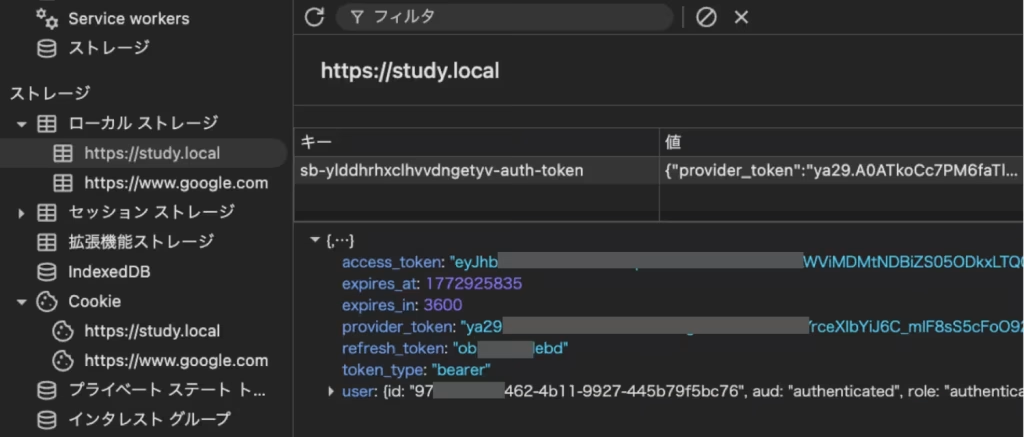
Unlike WordPress, which relies on cookies, Supabase manages authentication state using JWT tokens.
However, having a JWT does not mean unrestricted access within WordPress.
Permissions must still be controlled using WordPress’s role system.
Keep Only Minimal User Data in WordPress
From this perspective, WordPress only needs minimal user information required for display and permission control.
There is no need to store actual authentication credentials in WordPress.
This principle forms the foundation of Edel Auth for Supabase.
Design Decisions in Edel Auth for Supabase
Do Not Store Real Passwords
The most important design decision was not storing real passwords in WordPress.
Instead, a random dummy string is stored in wp_users, while actual authentication is handled by Supabase.
This ensures that even if the WordPress database is compromised, authentication data remains protected.
Just-in-Time User Synchronization
Users are not imported in bulk. Instead, they are created or updated only when they successfully log in.
This prevents unnecessary database growth and keeps wp_users clean.
Separate Login Flows
General users log in via front-end forms connected to Supabase, while administrators use standard WordPress login methods.
This separation improves both UX and security.
Combining JWT and WordPress Cookies
This system does not rely solely on JWT.
After login, WordPress authentication cookies are also issued, allowing compatibility with functions like is_user_logged_in() and role management.
This creates a hybrid model where Supabase handles identity verification, and WordPress manages session state and permissions.
Shortcodes for Front-End Login
Login and registration forms are implemented via shortcodes to allow front-end placement.
This improves design flexibility and keeps users away from default admin login screens.
Security Considerations
JWT ≠ WordPress Permissions
JWT proves identity but does not determine permissions. WordPress roles must still control access.
Protect the service_role Key
The Supabase service_role key must never be exposed. Proper key management is critical.
Caching and Nonce Issues
Authentication pages should be excluded from caching to avoid login errors caused by stale nonce values.
Strict Redirect Management
OAuth and password reset flows require precise redirect URL configuration across both Supabase and WordPress.
Best Use Cases
- Large membership sites
- Systems requiring shared authentication across services
- Projects separating admin and user login flows
- Cases where WordPress is used purely as a CMS
Shared Authentication Across Multiple WordPress Sites
Using the same Supabase project across multiple WordPress sites allows users to log in with a single account across services.
This centralizes authentication while keeping WordPress instances lightweight.
Summary
- Do not store real passwords in WordPress
- Synchronize users only when needed
- Separate login flows for admins and users
- Use Supabase for authentication and WordPress for authorization
- Bridge authentication into WordPress cookies for compatibility
When designing membership systems, consider not just login functionality, but also where authentication data lives, how permissions are handled, and how users interact with the system.
Combining WordPress with external authentication like Supabase is a powerful approach for building scalable and secure systems.
この記事を書いた人

矢部 敦合同会社Edel Hearts 代表
WordPress専門の開発会社を経営。プラグイン開発・カスタマイズ・保守を専門とし、18時間におよぶUdemyのWordPress講座を開講。出典付きで回答するAIチャットボット「Edel AI Hybrid Chat」開発者。著書『WordPress はじめての最小プラグイン』(Kindle)。本ブログの記事は、実際の開発・運用で得た一次情報をもとに執筆しています。会社情報はこちら