Have you ever used Google’s free performance diagnostic tool, PageSpeed Insights? Many of you may have checked how fast your site loads at least once.
Recently, I redesigned several pages on my own website and casually ran a performance test… only to be shocked by the mobile results.
The redesign improved the design and functionality, but behind the scenes, I had paid a heavy price in loading performance.
The Shocking “7,950ms Potential Savings”
When I opened the report, I saw a terrifying number: “Estimated savings: 7,950ms”.
At first, I thought, “Is my page freezing for 8 seconds?” But that’s not exactly the case. This number represents theoretical inefficiencies—how much unnecessary processing is happening before the page fully renders.
However, that vague feeling of “this site is a bit slow” is built from the accumulation of these delays.
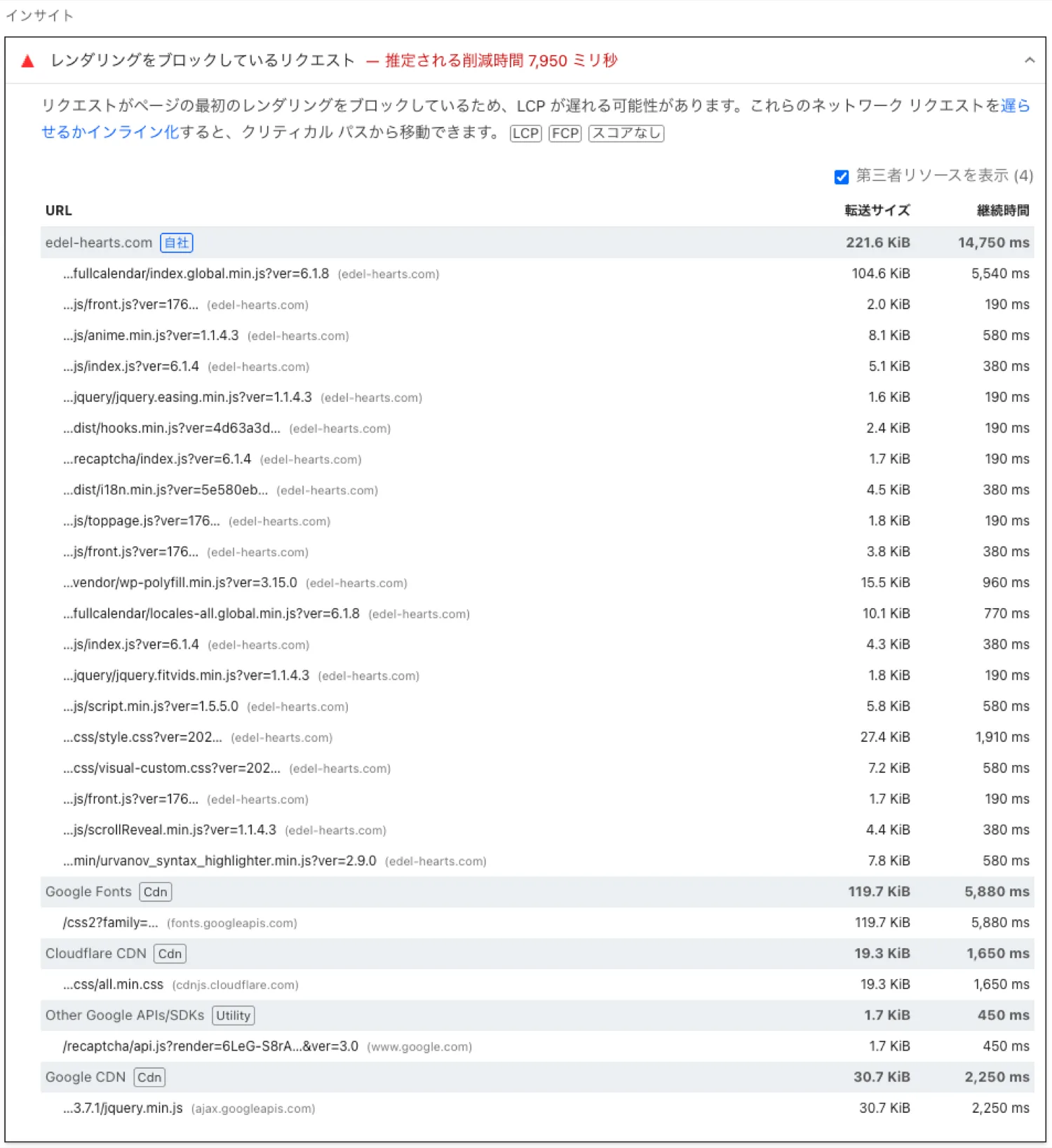
The cause was heavy JavaScript for rich animations and plugin resources being loaded globally on every page. It was like “running while wearing heavy armor.” In this state, users may leave before even experiencing your content.
As an engineer, I couldn’t ignore this bottleneck. This time, I tackled the issue directly by writing optimization code in functions.php.
functions.php. These optimizations are tailored specifically for the edel-hearts.com environment. Since plugin handles and configurations differ per site, improper use may break your layout.
[/capbox]
Targeted Optimization: Making Only the Homepage Ultra-Fast
The strategy I used was a “post-load override” approach from the child theme.
The key design goal was: “Make only the homepage extremely fast without breaking functionality on other pages.”
Remove Unnecessary Resources Only on the Homepage
add_action( 'wp_enqueue_scripts', function() {
  if ( !is_front_page() ) return;

  wp_dequeue_script( 'google-recaptcha' );
  wp_dequeue_style( 'all-min-css' );
}, 100 );
Disable Specific Plugin Assets (e.g., Syntax Highlighter)
add_action('wp_enqueue_scripts', function() {
  if ( !is_front_page() ) return;

  wp_dequeue_style('urvanov_syntax_highlighter');
  wp_dequeue_style('crayon-theme-classic');
  wp_dequeue_script('urvanov_syntax_highlighter_js');
}, 100 );
Convert Main CSS to Preload (Avoid Render Blocking)
add_filter( 'style_loader_tag', function ( $html, $handle ) {
  if ( !is_front_page() ) return $html;

  if ( $handle === 'digipress' || $handle === 'dp-visual' ) {
    $html = str_replace( "rel='stylesheet'", "rel='preload' as='style' onload="this.onload=null;this.rel='stylesheet'"", $html );
  }
  return $html;
}, 10, 2 );
Apply defer to Key Scripts
add_filter( 'script_loader_tag', function ( $tag, $handle ) {
  if ( !is_front_page() ) return $tag;

  $defer_scripts = [ 'easing', 'anime', 'dp-main-js', 'edel-faq-navigator-front-js', 'rank-math-js' ];
  if ( in_array( $handle, $defer_scripts ) ) {
    return str_replace( ' src', ' defer src', $tag );
  }
  return $tag;
}, 10, 2 );
By guarding everything with is_front_page(), I successfully optimized the homepage while preserving critical functionality like contact forms.

Recommended Strategy from My Udemy Course
These practical techniques are also covered in my Udemy course.
In modern WordPress development, I recommend using strategy-based script loading like this:
$strategy = array(
  'in_footer' => true,
  'strategy'  => 'defer'
);

wp_register_script(
  'handle-name',
  'path/to/script.js',
  array('jquery'),
  '1.0.0',
  $strategy
);
Don’t just load scripts—load them intelligently. Use defer to avoid blocking rendering, and ensure plugins only load assets where necessary.
Back to an Impressive “96%” Score
By combining “load timing control” and “eliminating unnecessary requests,” the result was dramatic…
The desktop performance score recovered to an impressive 96%!

Additionally, all other metrics reached a perfect 100—Accessibility, Best Practices, and SEO.
This means not only a fast site, but one that is recognized as highly usable by both search engines and users.
Before applying advanced optimizations, make sure your fundamentals are solid. Check this guide as well:
Conclusion: Maximizing Site Value Through Technology
This journey started with a surprising result: “The site got slower after redesign.”
But with the right knowledge and use of WordPress hooks, it became clear that functionality and performance can coexist.
By learning advanced techniques like those taught in my course, you can significantly increase your site’s value.
If you want to achieve 90%+ performance or learn real-world plugin development techniques, check out my Udemy course.
At Edel Hearts, we use these techniques to make WordPress sites more powerful—and faster.
If you need help with WordPress customization or advanced plugin development, feel free to contact us.
We hope these “strict optimization techniques” help improve your own website performance!