In this edition of “3-Minute Hooking,” I’ll introduce a technique for automatically inserting alt attributes into images.
Alt attributes are important for both SEO and accessibility. However, because “the visual appearance does not change even if they are not set,” they tend to be postponed. Especially on sites with a large number of articles, going back and updating older content manually is not realistic.
By simply adding a hook in functions.php, you can handle images across all existing articles in bulk.
I’ll explain this in two stages: a basic version and an advanced version.
What’s the Problem with Missing Alt Attributes?
First, let’s整理 how images (img tags) without alt attributes are evaluated from an SEO perspective.
| Status | SEO Evaluation | Reason |
|---|---|---|
alt="appropriate text" |
✅ Best | Google can accurately understand the content of the image |
alt="" (intentionally empty) |
✅ Acceptable | Explicitly marked as decorative. Google skips it |
| No alt attribute | ⚠️ Unclear | Google attempts to infer meaning from file name and page context |
alt="screenshot-10" |
❌ Worst | May be treated as meaningless noise and negatively affect evaluation |
The key point is that having meaningless text in the alt attribute is worse for SEO than having no alt attribute at all. If the alt attribute is missing, Google tries to infer meaning from context. However, if meaningless text is present, it may be treated as noise.
In other words, the priority should be:
- Set meaningful and appropriate alt text (ideal)
- Explicitly set
alt=""for decorative images - At the very least, avoid inserting meaningless text
This hook provides a practical two-step approach: in the basic version, explicitly set alt="" for images without alt; in the advanced version, automatically insert meaningful text based on the nearest heading for images with missing or empty alt attributes.
[Basic Version] Automatically Add alt="" to img Tags with Missing or Empty Alt Attributes
First, here is the simplest approach: automatically add alt="" to img tags where alt is missing or empty.
By explicitly telling Google that “this image is decorative,” evaluation becomes more stable than inserting meaningless strings.
add_filter('the_content', 'wp3min_simple_auto_alt');
function wp3min_simple_auto_alt($content) {
// Add alt="" to img tags without alt
$content = preg_replace(
'/![]() ]*salt=)([^>]*?)>/i',
'
]*salt=)([^>]*?)>/i',
'![]() ',
$content
);
// Normalize cases where alt exists but is only whitespace
$content = preg_replace(
'/(
',
$content
);
// Normalize cases where alt exists but is only whitespace
$content = preg_replace(
'/(![]() ]*?)alt=["'][s]*["']([^>]*?>)/i',
'$1alt=""$2',
$content
);
return $content;
}
]*?)alt=["'][s]*["']([^>]*?>)/i',
'$1alt=""$2',
$content
);
return $content;
}How the Code Works
It covers all of the following patterns:
| Before | After |
|---|---|
<img src="photo.jpg"> |
<img alt="" src="photo.jpg"> |
<img src="photo.jpg" alt=""> |
<img src="photo.jpg" alt=""> (unchanged) |
<img src="photo.jpg" alt=" "> |
<img src="photo.jpg" alt=""> |
<img src="photo.jpg" alt="description"> |
<img src="photo.jpg" alt="description"> (unchanged) |
No changes are made to images that already have alt text.
[Advanced Version] Automatically Insert the Nearest Heading into Alt Attributes
The basic alt="" approach is already useful, but this advanced version is for those who want to go one step further.
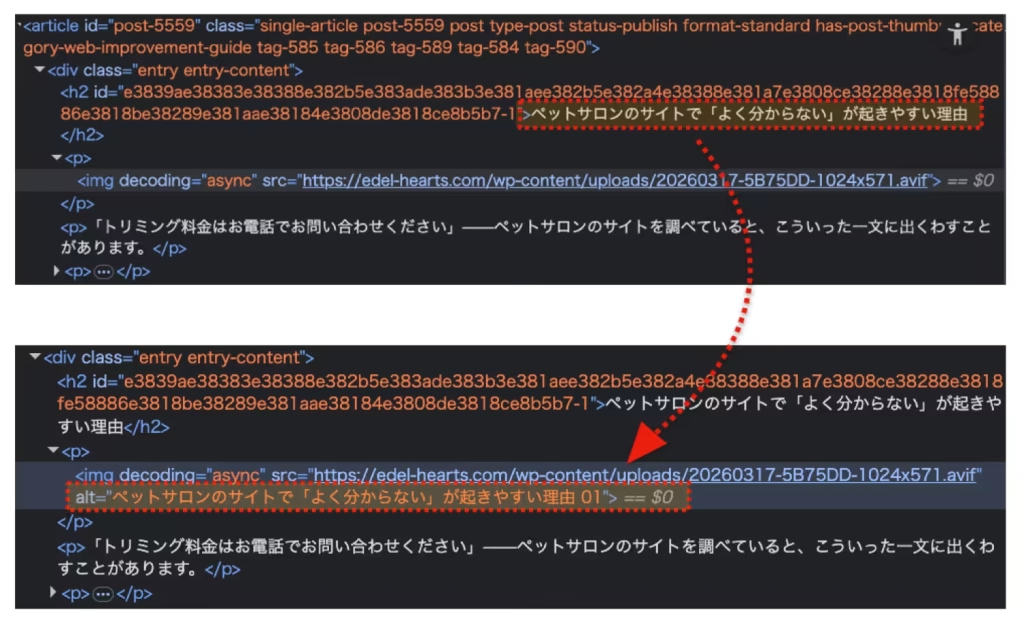
It retrieves the text of the nearest preceding heading (h1–h6) and automatically inserts it as alt text. If multiple images exist under the same heading, they are distinguished with sequential numbering (01, 02, etc.).
Example Output
About WordPress Plugins
WordPress plugins are ...


About WordPress Plugins
WordPress plugins are ...
Code
To properly parse HTML, this uses DOMDocument instead of regular expressions, making it safer for complex structures.
Notes
- Images with existing alt text are never modified.
- If no heading is found,
alt=""is applied (treated as decorative) DOMDocumentis built into PHP, so no additional libraries are required- Images generated by page builders like Elementor are not processed because they do not pass through
the_content
Implementation Steps
- Open your child theme’s
functions.php(do not edit the parent theme) - Paste the code above and save
- View an article page and check alt attributes using browser developer tools (Mac: Cmd + Option + I / Windows: F12)
The database is not modified—HTML is processed only at render time—so removing the hook restores the original state. This is a safe implementation with minimal side effects.
Example of Heading Text Inserted by Hook
Going Further: AI-Based Alt Generation
This hook improves alt text from “better than nothing” to “context-aware,” but truly appropriate alt text requires understanding the image itself.
For example, even under the same heading “What is WordPress?”, a screenshot of the admin dashboard and a logo image should have different alt text.
To solve this, I am currently developing a WordPress plugin that uses generative AI to read article context and suggest appropriate alt text.
- List articles with missing alt text from the admin screen
- Check image count, file types, and current alt status
- AI suggests appropriate alt text based on context (with human confirmation before saving)
More details will be shared in a future update.
Summary
- From an SEO perspective, meaningless alt text is worse than having no alt attribute
- Basic version: Automatically add
alt=""to missing or empty alt attributes - Advanced version: Insert nearest heading text as alt for contextual relevance
- Both approaches use
the_contentfilter, so the database remains untouched
Stay tuned for the next “WordPress 3-Minute Hooking” article!
For WordPress SEO improvements and maintenance support, please see: